skip to main content

Internal Objects : SpoolPrinter class (com.iscobol.rts.print.SpoolPrinter) and the Print Preview

SpoolPrinter class (com.iscobol.rts.print.SpoolPrinter) and the Print Preview
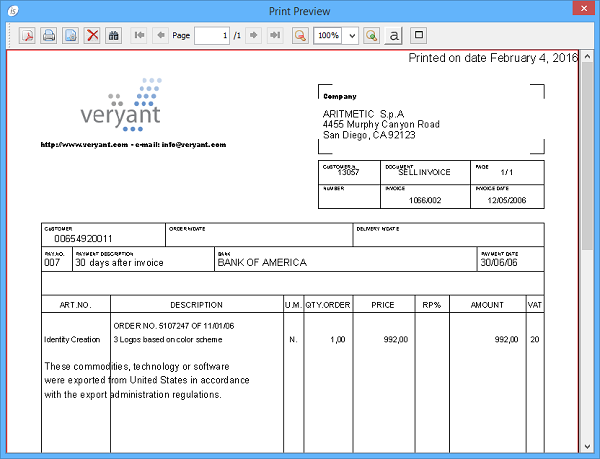
The isCOBOL Framework provides the ability to obtain a print preview.
This feature is applicable to all print files. In order to obtain a print preview you need to define the file as follows:
SELECT print-prev ASSIGN TO PRINT "-P PREVIEW"
       ORGANIZATION LINE SEQUENTIAL.
The preview dialog will show up when the print file is closed.
The tool-bar on top of the dialog allows you to:
The dialog title can be set through the configuration property iscobol.print.preview.title.
The dialog icon can be changed through the configuration property iscobol.print.preview.icon.
The com.iscobol.rts.print.SpoolPrinter class
The print preview dialog can be customized by calling methods of the internal factory class com.iscobol.rts.print.SpoolPrinter. These methods must be called before the print file is closed. The following table shows the javadoc of the existing methods.
Returns if the Printer Setup dialog must be shown before printing
setDialogTitle(String title)
setImageIcon(static javax.swing.ImageIcon)
setPreviewAliasing(boolean aliasing)
setPreviewLocation(int x, int y)
setPreviewMaximized(boolean maximize)
setPreviewScale(double scale)
setPreviewSize(int width, int height)
setShowPrintButton(boolean showPrintButton)
setShowPrintDialog(boolean showPrintDialog)
Choose if the Printer Setup dialog must be shown before printing
setShowPrintSetupButton(boolean showPrintSetupButton)
setShowSaveButton(boolean showSaveButton)
The following sample shows how to make the preview dialog appear with the zoom set to 50%:
CONFIGURATION SECTION.
    class is-spoolprinter as "com.iscobol.rts.print.SpoolPrinter"
INPUT-OUTPUT SECTION.
    select print-job assign to printer "-P PREVIEW"
           organization line sequential.
FILE SECTION.
FD  print-job.
01  print-record pic x(83).
PROCEDURE DIVISION.
    open output print-job.
    write print-record from "test zoom".
    is-spoolprinter:>setPreviewScale(50 as double).
    close print-job.
    goback.
Thin Client
In a Thin Client environment, print jobs are managed client side so the print preview dialog must be configured and invoked client side. In order to invoke com.iscobol.rts.print.SpoolPrinter methods client side, you can rely on the CobolGUIJavaBean Class (com.iscobol.gui.server.CobolGUIJavaBean).
The following sample shows how to make the preview dialog appear client side with the zoom set to 50%:
CONFIGURATION SECTION.
    class is-java-bean as "com.iscobol.gui.server.CobolGUIJavaBean"
    class j-double     as "java.lang.Double"
INPUT-OUTPUT SECTION.
    select print-job assign to printer "-P PREVIEW"
           organization line sequential.
FILE SECTION.
FD  print-job.
01  print-record pic x(83).
PROCEDURE DIVISION.
    open output print-job.
    write print-record from "test zoom".
    is-java-bean:>callStaticMethod("com.iscobol.rts.print.SpoolPrinter", "setPreviewScale", j-double:>new(50 as double)).
    close print-job.
    goback.
Note - The com.iscobol.preview.PreviewDialogSettings JavaBean has been deprecated. It’s still supported for backward compatibility but it lacks of the latest methods implemented in com.iscobol.rts.print.SpoolPrinter.

Copyright (c) 2017 Veryant
Contact us
Please share your comments on this manual or on any
Veryant product documentation with the email button at the top left