skip to main content

Utilities : ISL (isCOBOL Launcher)

ISL (isCOBOL Launcher)
The ISL utility helps setting up startup commands for your COBOL application.
Usage:
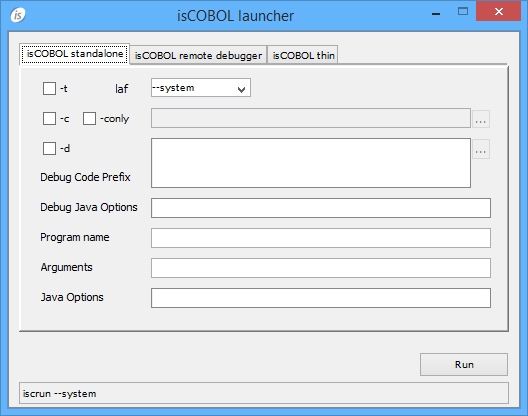
Configuring isCOBOL standalone
In this screen you can set up the command to run a COBOL program in stand alone mode, with or without debug.
 
While you fill the fields and check the options, the resulting command is shown in the entry-field on the bottom of the screen; you can copy it to the clipboard and paste it in a batch file using a text editor. Click the Run button to start the COBOL program.
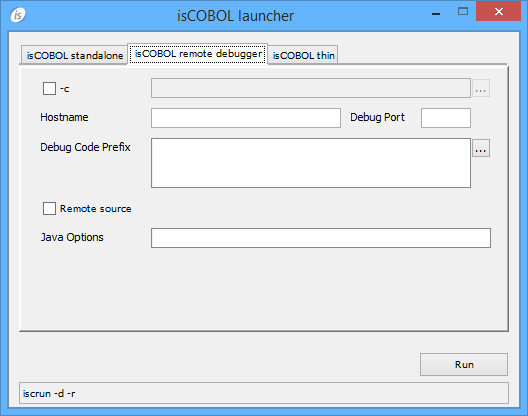
Configuring isCOBOL remote debugger
In this screen you can set up the command to remotely debug a COBOL program, assuming that you know the IP address and port of a Debugger listener.
 
While you fill the fields and check the options, the resulting command is shown in the entry-field on the bottom of the screen; you can copy it to the clipboard and paste it in a batch file using a text editor. Click the Run button to start the COBOL program.
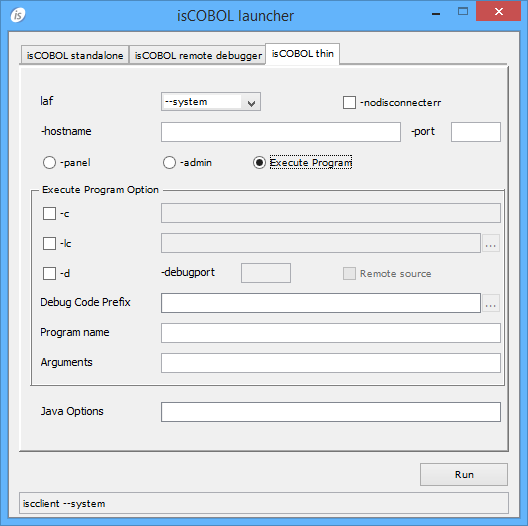
Configuring isCOBOL thin
In this screen you can set up the command to run or debug a COBOL program in thin client mode, assuming that you know the IP address and port of a listening Application Server. You can also run server administration utilities from here.
 
Execute program options
While you fill the fields and check the options, the resulting command is shown in the entry-field on the bottom of the screen; you can copy it to the clipboard and paste it in a batch file using a text editor. Click the Run button to start the COBOL program.
Presets
ISL inherits most of the settings from the environment in which it’s launched. For settings that cannot be inherited, some configuration properties are provided. See Library Routines and Utilities Configuration for the list and description of these properties.
Thin Client
ISL can’t be used in thin client environment.

Copyright (c) 2017 Veryant
Contact us
Please share your comments on this manual or on any
Veryant product documentation with the email button at the top left