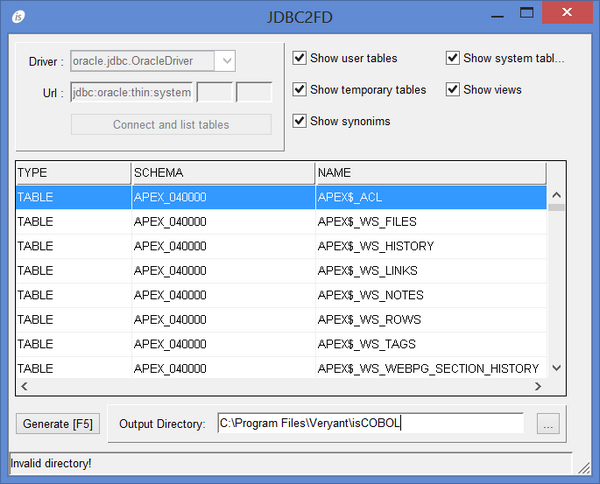
JDBC2FD The JDBC2FD utility generates file description copybooks from database tables. GUI Usage: jdbc2fd Select the JDBC Driver (or type it if it doesn’t appear in the list) and type the JDBC Url, then click “Connect and list tables” to obtain the list of the tables. The Url field is divided into three subfields: the first one contains the base url while the others allow you to specify the username and password. You can compile all the fields or provide a full url in the first and leave the other two blank. Results can be filtered using the check-boxes on the right. Choose the output directory for the copyfiles that will be generated, select the desired table and click the “Generate” button or press F5 to generate copybooks. Command-line Usage: jdbc2fd tableName [outputDirectory] JDBC settings are retrieved by the iscobol.jdbc.driver and iscobol.jdbc.url configuration properties. If outputDirectory is omitted, the current directory is used. Three copybooks are generated for each table. tableName.sl SELECT statement for FILE-CONTROL paragraph. tableName.fd File description entry and include of the below copybook tableName.wrk Record description Thin Client JDBC2FD can be used in thin client environment as well. Use this command to start it: iscclient -hostname <server-ip> -port <server-port> -utility jdbc2fd <arguments> The JDBC driver must be available in the server Classpath and copy files are generated on the server machine.