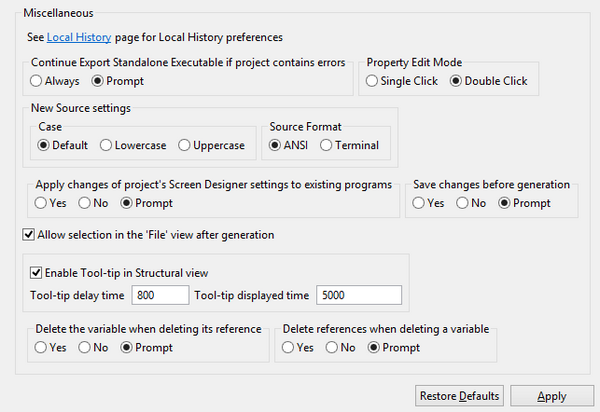
Miscellaneous options Preferences: isCOBOL Below the Java association, you can configure miscellaneous options. By default you have to double click on a property value in the Screen Designer in order to edit it. If you prefer to use a single click, this is the place where to configure it. By default the IDE prompts you to save changes made on the screen before generating the source code. From this panel you can also choose if duplicated control IDs are allowed by the Screen Designer; by default, if you set the ID property of a control to a value that has already been used by another control ID, the IDE shows an error. By default, the IDE automatically selects the generated source code after the code generation is complete. In this way you can quickly compile it without carrying on selecting it from the isCOBOL Explorer tree. If you wish to disable this feature, uncheck the option “Allow selection in the isCOBOL Explorer after generation”. Tool-tips are shown in the Structural View when you leave the mouse pointer over a program name. The tool-tip text is set to the content of REMARKS, if available, or to "no description" otherwise. You can disable this feature or change the timeout for the tool-tips in the Screen Designer preferences. "Delete the variable when deleting its reference" and "Delete references when deleting a variable" allow to avoid leaving useless items in the program when something is deleted. For example, if you delete a graphical control from the Screen Designer, probably you don’t need anymore the variables that were associated to it, so it’s worthwhile to delete them. By default the IDE always ask you what to do, but you can configure it to always delete referenced items or never delete referenced items without asking to the user.