skip to main content

Integrated Development Environment (IDE) : Configuration : Customization : Setting the Project initial settings

Setting the Project initial settings
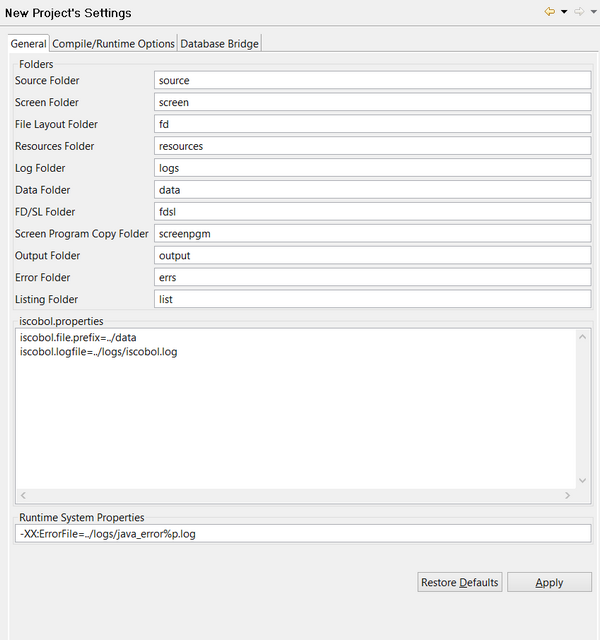
The “New Project’s initial settings” panel allows you to customize the name of the Project folders, a list of configuration properties that should always be used for Project programs, and a list of Java options that must be used at program launch.
In addition, compile and runtime options can be set. See Compiling for a complete description of these options.
If you change the name of any of the directories in this panel, the corresponding compiler option is updated.
In this panel you can also configure Database Bridge subroutines generation. See Generating Database Bridge subroutines for details about this feature.
These settings will be applied to the next project you create; you will be then allowed to edit them in each single project by clicking on Project menu and selecting Properties.
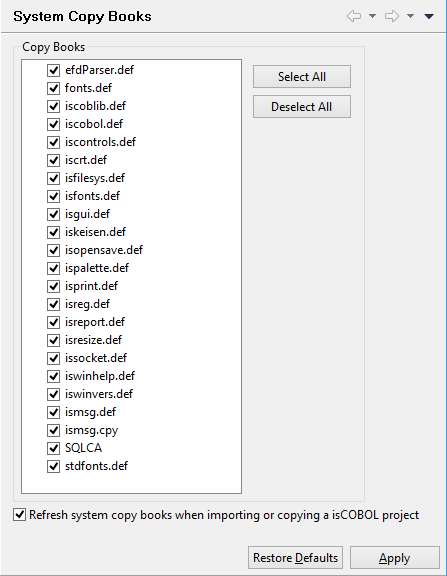
This panel allows to choose which system copy books must be included by default in the project cpy folder.
If the option "Refresh system copy books when importing or copying a isCOBOL project" is checked, when the user imports or copies a isCOBOL project, all the copybooks are reloaded; if they already exist, they are replaced. If the option is not checked, instead, only the copybooks that don’t exist are reloaded.

Copyright (c) 2017 Veryant
Contact us
Please share your comments on this manual or on any
Veryant product documentation with the email button at the top left