skip to main content

Integrated Development Environment (IDE) : Configuration : Customization : Setting Run/Debug options

Setting Run/Debug options
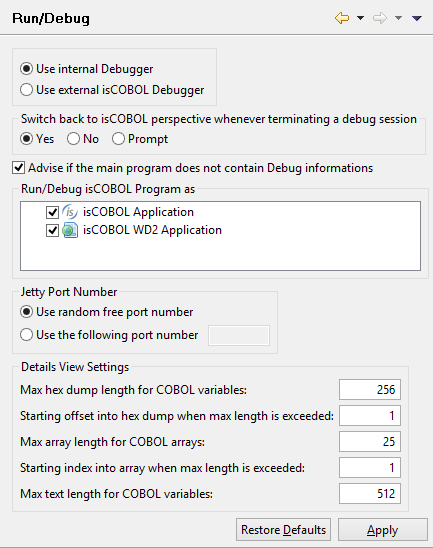
The ”Run/Debug” panel allows to configure options for the Run As and Debug As functions.
In this panel is also possible to configure the port used by Jetty, an internal servlet container that the IDE uses to run programs as ‘WD2 Application’ or ‘EIS Application.’ By default, a random port is used at each launch. If you want the IDE to use always the same port, here you can configure it.
Unchecking either isCOBOL Application or isCOBOL WD2 Application causes the other option to be used directly when the user run or debug a program.

Copyright (c) 2017 Veryant
Contact us
Please share your comments on this manual or on any
Veryant product documentation with the email button at the top left