skip to main content

Integrated Development Environment (IDE) : Import / Export of Workspace settings

Import / Export of Workspace settings
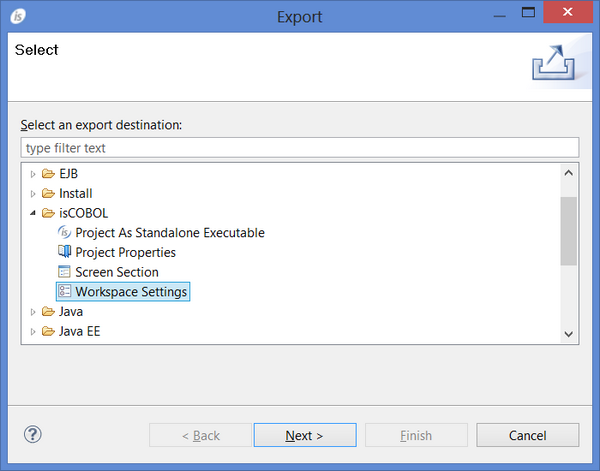
To export workspace preferences:
1.
Click on the File menu
2.
Choose Export
3.
Expand isCOBOL
4.
Choose Workspace settings
5.
Click Next
6.
7.
Click Finish
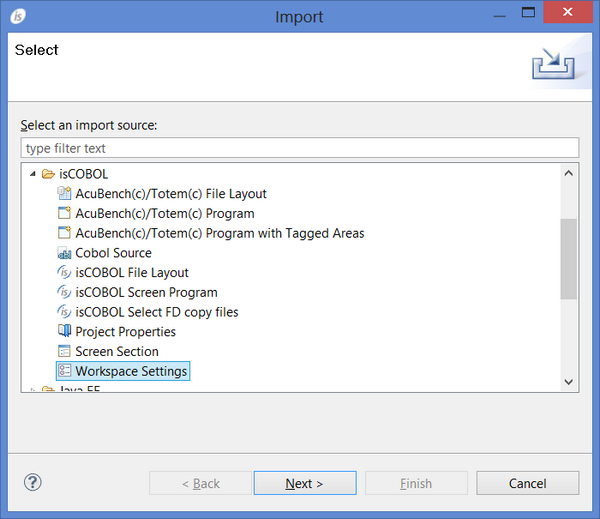
To import workspace preferences:
1.
Click on the File menu
2.
Choose Import
3.
Expand isCOBOL
4.
Choose Workspace settings
5.
Click Next
6.
7.
Click Finish

Copyright (c) 2017 Veryant
Contact us
Please share your comments on this manual or on any
Veryant product documentation with the email button at the top left