1.
2. Add the JDBC driver library provided by your database vendor to the project Classpath. Click on Project menu, select Properties, select Class Path from the tree. Click on the Add Jar button and browse for the JDBC jar file.
3. Set iscobol.file.index=easydb in the configuration (it can be done anywhere in the configuration, it doesn’t matter if your program performs SET ENVIRONMENT before opening a file or if you prefer to edit the iscobol.properties file).Set iscobol.jdbc.driver, iscobol.jdbc.url and any other applicable JDBC setting for your database connection in the configuration (it can be done anywhere in the configuration, it doesn’t matter if your program performs SET ENVIRONMENT before opening a file or if you prefer to edit the iscobol.properties file).
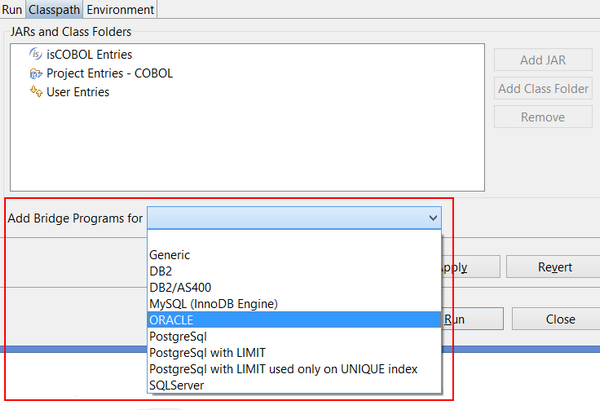
4. Edit the Run Configuration of your program and, in the Classpath page, bind the proper database routines set:
| Copyright (c) 2017 Veryant |
| Contact us |
|
Please share your comments on this manual or on any Veryant product documentation with the email button at the top left |