skip to main content

Integrated Development Environment (IDE) : Working with Projects : Deployment facility (JAR)

Deployment facility (JAR)
isCOBOL IDE allows you to build a stand-alone package of your project in order to facilitate the deployment.
This is useful to deploy desktop applications.
1.
2.
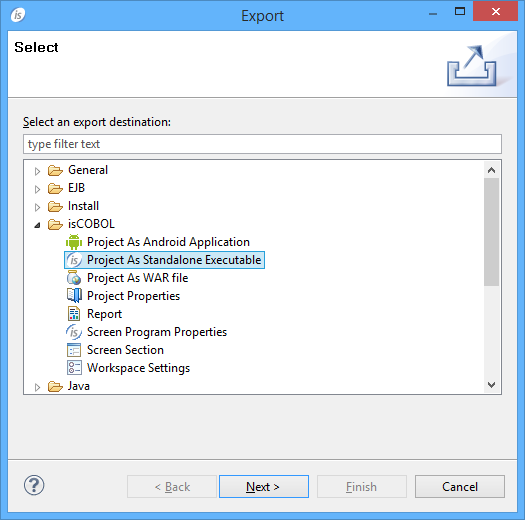
Choose Export from the pop-up menu.
3.
Choose isCOBOL / Project As Standalone Executable from the tree.
4.
Click Next.
5.
6.
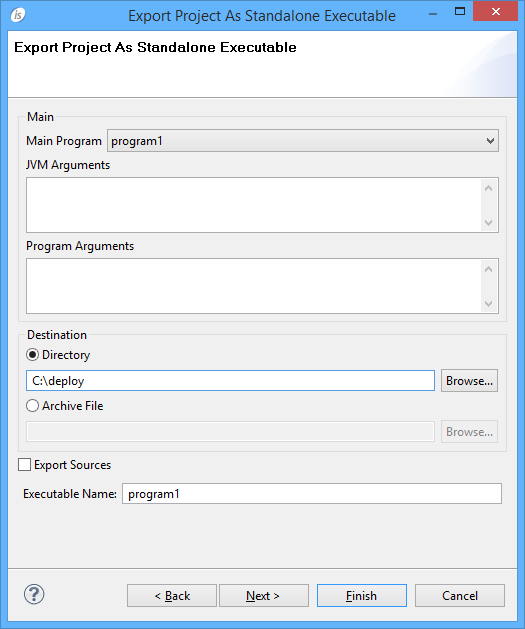
Click Next.
7.
o
Main Program - select the main program from the ones in the project.
o
JVM Arguments - optionally specify arguments for the JVM (e.g. -Xmx option).
o
Program Arguments - optionally specify command-line parameters for the COBOL program.
o
Destination - store resulting files in a folder or in a tar archive.
o
Export Sources - optionally include source files in the package.
o
Executable Name - name of the jar that will allow you to start the COBOL application (the jar extension is automatically applied, do not specify it).
8.
If the project needs external jar files, click Next and choose to export them as well before clicking Finish. Otherwise click Finish.
The package is generated in the folder (or in the archive) specified by Destination (see point 7). The package consists of the following folder structure:
o
output - contains COBOL program class files.
o
resources - contains the configuration file and other resources for the project.
o
libs - contains necessary jar libraries such as the isCOBOL runtime and third party libraries (see point 8).
o
source - contains the source files (only if you checked Export Sources in point 7).
o
bin - contains the main jar that allows you to start the COBOL application (see Executable Name in point 7).
 
If jar files are associated with the JVM in the system, then you can start the application by double clicking on Executable Name.jar. Otherwise, change to that directory and run the command: java -jar Executable Name.jar.

Copyright (c) 2017 Veryant
Contact us
Please share your comments on this manual or on any
Veryant product documentation with the email button at the top left