skip to main content

Integrated Development Environment (IDE) : Jasper Studio Integration

Jasper Studio Integration
Jasper Studio can be installed as an additional plugin in the isCOBOL IDE.
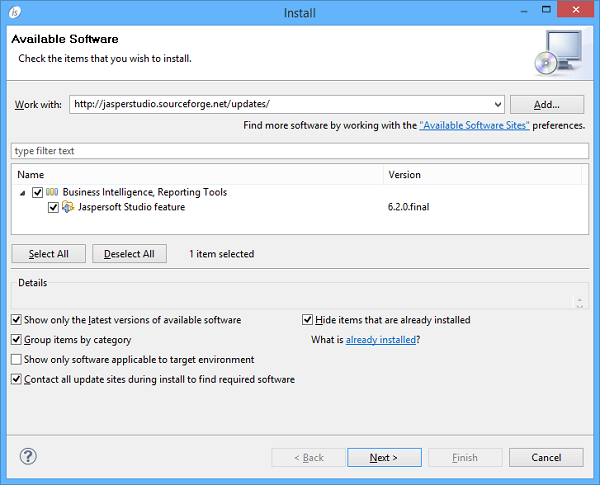
In order to install Japser Studio
1.
click on the Help menu and choose Install New Software...
2.
fill the Work with: field with the following update site url: http://jasperstudio.sourceforge.net/updates/
3.
4.
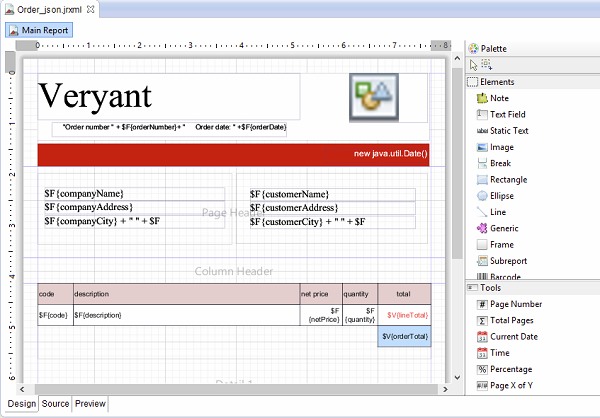
The Jasper Studio Designer allows isCOBOL users to create sophisticated layouts containing charts, images, sub-reports, crosstabs and much more. Moreover it enables you to access your data through JDBC, TableModels, JavaBeans, XML, Hibernate, CSV, and custom sources. Then to publish your reports as PDF, RTF, XML, XLS, CSV, HTML, XHTML, text, DOCX, or OpenOffice.

Copyright (c) 2017 Veryant
Contact us
Please share your comments on this manual or on any
Veryant product documentation with the email button at the top left