skip to main content

Integrated Development Environment (IDE) : Importing programs from Totem

Importing programs from Totem
Totem(TM) is the integrated development environment supplied by CASEMaker.
The following files can be imported:
The following files cannot be imported:
During the import process:
Note - Totem generated paragraphs are maintained in the source code, but their content is moved to the corresponding IDE generated paragraph and they just jump to it.
The best practice for importing Totem programs and their items consists in the following steps, in order:
1.
2.
3.
To import a Totem program:
1.
2.
Choose Import from the pop-up menu.
3.
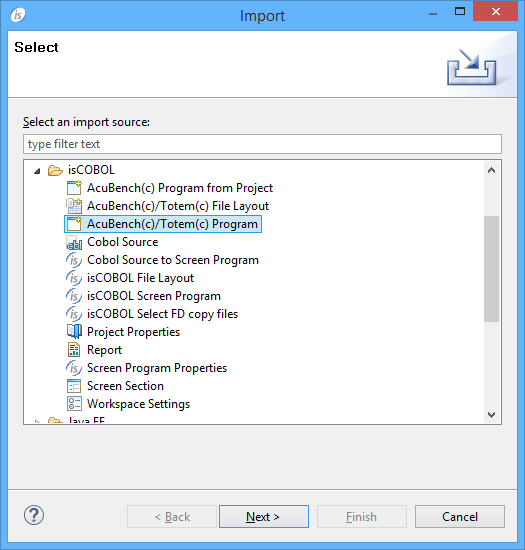
Choose isCOBOL / AcuBench(c)/Totem(c) Program from the tree.
4.
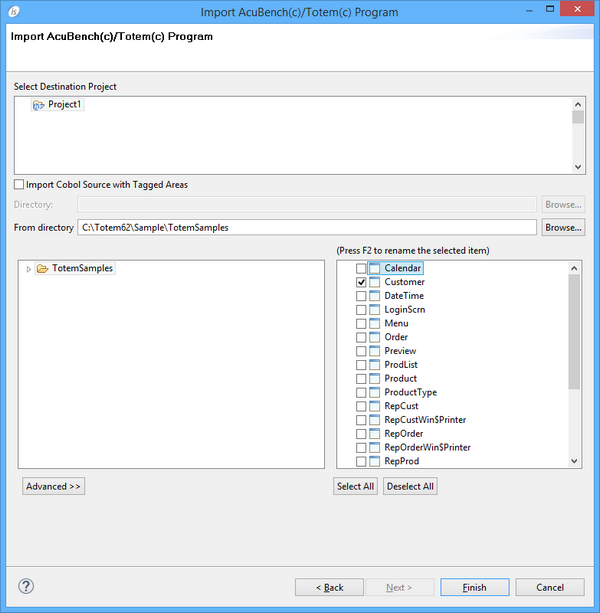
If the programs included custom code written outside of the tagged areas, check the option Import Cobol Source with Tagget Areas and provide the directory where the cbl files are stored.
5.
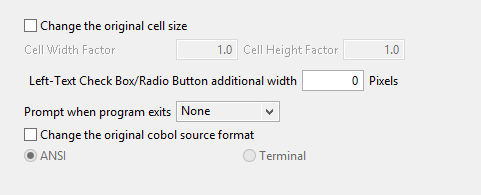
Before clicking on the Finish button you can optionally set one of the advanced options, such as changing the source format, set the action to be performed at program exit or altering the original cell size. Click on the Advanced >> button to show this panel:
6.
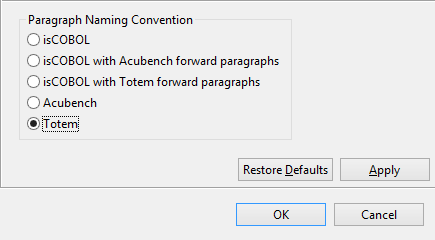
Changing the paragraph naming convention
Internal paragraphs such as “Initialize-Routine” are maintained as they are. If you prefer to have isCOBOL names such as “is-initial-routine” for them, or if you prefer to have both names with Totem’s paragraphs redirecting to isCOBOL’s paragraphs (like it happened with previous versions of the IDE)
1.
2.
choose Properties
3.
choose Screen Program / Source Compatibility
4.

Copyright (c) 2017 Veryant
Contact us
Please share your comments on this manual or on any
Veryant product documentation with the email button at the top left