skip to main content

Programming Guides : Web Services with isCOBOL : Creating Clients : The long story:

The long story:
If you have not done it already, download and unpack the isCOBOL for Apache Axis2 Web Service Sample (e.g. webservice_sample.zip). This sample includes a version of Axis2. Make sure that the AXIS2_HOME environment variable is set to the directory where Axis2 is installed.
In the ADB method of generating clients, all the functionality for the services are contained in a single class called a stub. The stub contains inner classes corresponding to all of the necessary objects defined in the WSDL file, such as, in the case of this WSDL, CheckCfMessage. Once you have the stub, you will be able to create a client by simply referring to these classes and their methods. To generate the client, issue the following command:
This command analyzes the WSDL file and creates the stub in the package client.UserFunctions. The options specify that you want the ADB data binding method (-d), and synchronous, or blocking, methods (-s). In other words, when the client makes a In-Out call to the service, it will wait for a response before continuing.
Once you run this command, you will see two new items in the directory. The first is the build.xml file, which contains the instructions for Ant to compile the generated classes. The second is the src directory, which contains the actual UserFunctionsStub.java file. If you open this file, you will see a collection of inner classes for each of the items in the WSDL file. You'll also see a number of calls to the Axis2 client API, including those that use axiom to build and analyze the incoming and outgoing messages.
Now you need a client to make use of this code. To create a client, create a new class and save it as Client.cbl in the userguide/client/UserFunctions directory. It should contain the following code:
Example: Client.cbl
identification division.
program-id Client.
environment division.
configuration section.
   class stub     as "client.userfunctions.UserFunctionsStub"
   class ReversezipCodeSearch as    "client.userfunctions.UserFunctionsStub.ReversezipCodeSearch"
   class ReversezipCodeSearchResponse as "client.userfunctions.UserFunctionsStub.ReversezipCodeSearchResponse"
   class j-exception   as "java.lang.Exception" .
data division.
working-storage section.
77  zipCode       pic x any length value "94101".
77  cityName      pic x any length.
77  url           pic x any length value "http://127.0.0.1:8080/axis2/services/UserFunctions".
77  w-stub  object reference stub.
77  w-ReversezipCodeSearch object reference ReversezipCodeSearch.
77  w-ReversezipCodeSearchResponse object reference ReversezipCodeSearchResponse.
procedure division.
      set w-stub = stub:>new(url as string)
      set w-ReversezipCodeSearch = ReversezipCodeSearch:>new()
      w-ReversezipCodeSearch:>setParam0(zipCode as string)
      set  w-ReversezipCodeSearchResponse = 
           w-stub:>ReversezipCodeSearch(w-ReversezipCodeSearch)
      set cityName = w-ReversezipCodeSearchResponse:>get_return()
      if cityName >= "0"
         display message cityName
         display message "Not Valid zipcode" icon 3
   catch j-exception
      display exception-object
   end-try.
Notice that using the service is simply a matter of creating and populating the appropriate type of request using the names defined in the WSDL file, and then using the stub to actually send the request to the appropriate method. For example, to call the ReversezipCodeSearch operation, you create a ReversezipCodeSearchRequest, use its setParam0() method to set the contents of itsString element, and pass it as an argument to stub.ReversezipCodeSearch()
To build the client, type:
This action creates two new directories, build and test. The test directory will be empty, but the build directory contains two versions of the client. The first version, in the lib directory, is a jar file that contains the Client class and the stub. The second, in the classes directory, is just the raw classes.
Make sure all of the jar files in the isCOBOL for Axis2 lib directory are on the classpath.
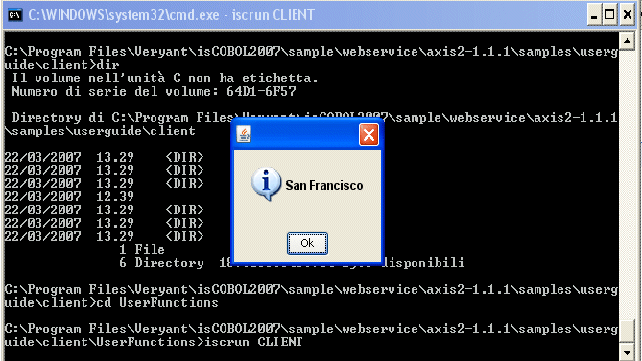
If you have a service corresponding to this client -- if you don't, check out the Building services document -- you can run the client by adding the jar file UserFunctions-test-client.jar to your classpath and typing:
You should see the response in a console window. It should look something like this:

Copyright (c) 2017 Veryant
Contact us
Please share your comments on this manual or on any
Veryant product documentation with the email button at the top left