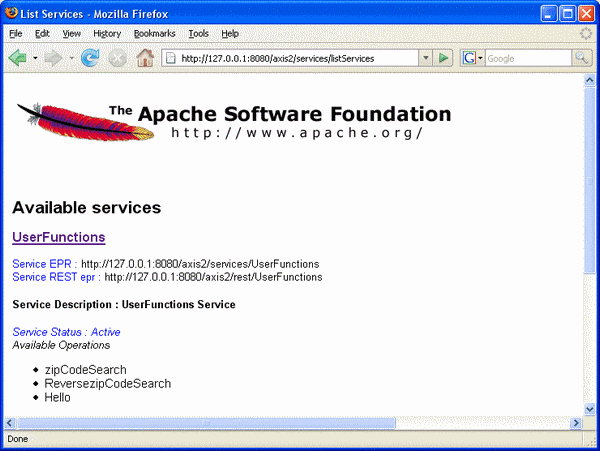
Deploying Legacy COBOL code One very easy way to create a Web service is simply to deploy the isCOBOL Java objects that represent the service. Start with the class, shown below: Example: Creating the Class UserFunctions identification division. class-id. UserFunctions as "server.UserFunctions". environment division. configuration section. repository. class j-string as "java.lang.String" identification division. factory. data division. working-storage section. 01 array-data occurs 4 indexed by idx. 03 a-zipcode pic x(5). 03 a-city pic x any length. 03 a-county pic x any length. 03 a-state pic x any length. procedure division. identification division. method-id. new as "new". data division. working-storage section. procedure division. main. move "94101" to a-zipcode(1). move "San Francisco" to a-city(1). move "San Francisco" to a-county(1). move "California" to a-state(1). move "33040" to a-zipcode(2). move "Key West" to a-city(2). move "Monroe" to a-county(2). move "Florida" to a-state(2). move "10001" to a-zipcode(3). move "New York" to a-city(3). move "New York" to a-county(3). move "New York" to a-state(3). move "89044" to a-zipcode(4). move "Las Vegas" to a-city(4). move "Clark" to a-county(4). move "Nevada York" to a-state(4). end method. identification division. method-id. zipCodeSearch as "zipCodeSearch". data division. working-storage section. 77 result pic s9. 77 w-city pic x any length. 77 w-state pic x any length. 77 results object reference j-string. linkage section. 77 city object reference j-string. 77 state object reference j-string. procedure division using city state returning results. main. set w-city to city set w-state to state move 1 to idx. search array-data varying idx at end set results to "-1" when w-city = a-city(idx) and w-state = a-state(idx) set results to a-zipcode(idx) end-search. end method. identification division. method-id. reverseZipCodeSearch as "ReversezipCodeSearch". data division. working-storage section. 77 results object reference j-string. 77 w-zipcode pic x any length. linkage section. 77 zipcode object reference j-string. procedure division using zipcode returning results. main. set w-zipcode to zipcode move 1 to idx. search array-data varying idx at end set results to "-1" when w-zipcode = a-zipcode(idx) set results to a-city(idx) end-search. end method. identification division. method-id. main as "Hello". data division. working-storage section. 01 stringa pic x(100). linkage section. 77 stringa-l object reference j-string. 77 results object reference j-string. procedure division using stringa-l returning results. main. set stringa to stringa-l display stringa end method. end factory. Next, you'll need to tell isCOBOL for Axis2 what class corresponds to what Web service calls. Do this by creating a file called services.xml and adding the following shown below: Example: Creating services.xml <service name="UserFunctions" scope="application"> <description> UserFunctions Service </description> <messageReceivers> <messageReceiver mep="http://www.w3.org/2004/08/wsdl/in-only" class="org.apache.axis2.rpc.receivers.RPCInOnlyMessageReceiver"/> <messageReceiver mep="http://www.w3.org/2004/08/wsdl/in-out" class="org.apache.axis2.rpc.receivers.RPCMessageReceiver"/> </messageReceivers> <parameter name="ServiceClass" locked="false">server.UserFunctions</parameter> <excludeOperations> <operation>finalize</operation> <operation>iscobolVersion</operation> <operation>iscobolRequired</operation> <operation>get$CopyPath</operation> <operation>get$Lines</operation> <operation>get$Filenames</operation> <operation>get$Sourcefile</operation> <operation>get$Sourcefile</operation> <operation>get$Copyfiles</operation> <operation>get$Paragraphs</operation> </excludeOperations> </service> This file makes the InOnly and InOut MEPs available to the service and tells Axis2 which class to call; operations must match method names. In other words, isCOBOL for Axis2 automatically sends a call to the multipleParametersAdd operation to the org.apache.axis2.axis2userguide.SampleService.multipleParametersAdd() method. Now it's time to create the distribution. Arrange your files in the following directory structure: Example: Create the Directory Structure for the Distribution - SampleService - META-INF - services.xml - server - UserFunctions.class Now you need to deploy the service to the server. To do that, generate UserFunctions.aar using jar -cvf UserFunctions.aar *. Copy the UserFunctions.aar file to the WEB-INF/services directory of the application server. (You also have the option to use the administration tools. See the Web Administrator's Guide for more information.) To verify that the service has been properly deployed, check the list of services at http://<host>:<port>/axis2/services/listServices. Now you should be able to access the service using any of the clients built in the Generating Clients document.