skip to main content

Character Based Screens : Using CHARVA

Using CHARVA
isCOBOL supports any terminal that has a description in the terminfo database on the system; in other words, all popular terminals such as VT100, VT220, Wyse and ANSI terminals and the "xterm" and "PuTTY" terminal emulators are supported. Support for UTF-8 character sets is also included (e.g. for Hungarian, Czech, Cyrillic, Korean etc). This feature is implemented using the CHARVA Toolkit.
CHARVA was designed to bring the power and flexibility of Java to applications on Linux/Unix systems (and has also been ported to MS Windows).
Terminal-based applications can now benefit from Java features such as object orientation, multithreading, automatic garbage-collection, and a vast range of libraries.
How to run the program
CHARVA has been embedded in the isCOBOL Framework. In order to enable its use, the following entry must be set in the configuration:
The above setting is automatically activated by the -t option provided by iscrun, so in order to run a program with CHARVA, it’s enough to issue the command:
In order to make isCOBOL work correctly with CHARVA, the terminal library (Terminal.dll on Windows and libterminal.so on Unix) must be available in the Java library path while charva.jar, commons-logging.jar and commons-logging-api.jar must be listed in the CLASSPATH.
CHARVA is for purely character-based applications and should not be used with graphical controls. Displaying graphical controls does not usually have any adverse effects, but it can cause unpredictable behavior.
Colors are not enabled by default. In order to activate support for colors, the charva.colors Java property must be set to True. For example:
Note: In isCOBOL, the background and foreground colors are mapped in the RGB color model, but the CHARVA toolkit does not recognize the attribute highlight in the RGB color value so, when either blue or green or red is greater than 192, the bold attribute is set for the control.
How to debug
Programs that run with CHARVA cannot be debugged directly since the Debugger traps the display that should be redirected to the console, causing Exception errors.
In order to debug a program that runs with CHARVA, the Remote Debugger must be used. So, for example:
Known limitations and differences between Charva and emulated character mode
DISPLAY MESSAGE BOX is not supported. Message box text can be printed on the console if iscobol.display_message configuration property is set to 1 or 2.
When using CHARVA, iscobol.terminal.cursor_type is ignored: the cursor has the default shape provided by the current terminal. In addition, iscobol.terminal.autowrap (boolean) is ignored: the display always wraps.
isCOBOL maps the background and foreground colors to the RGB color model, but CHARVA does not recognize the highlight attribute in the RGB color value, therefore isCOBOL applies the highlight attribute to the control when either the blue or green or red value is greater than 128.
The WFONT-GET-FONT function works only if WFDEVICE-WIN-PRINTER is set to TRUE, otherwise WFONTERR-FONT-NOT-FOUND is returned.
PuTTY configuration
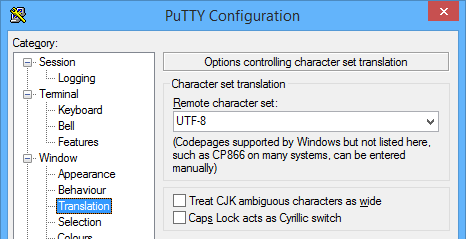
When PuTTY is used to connect to a Unix server and run a COBOL program through CHARVA, you should set the Character set translation to match the locale of the server. The locale of the server can be retrieved by checking the LANG environment variable:
For example, if the locale of the server is "UTF-8", configure PuTTY as follows:
When working with UTF-8, the following setting should also be set:
The nonobservance of the above suggestions may lead to bad display of grave letters and drawings.
Keyboard shortcuts
To force a refresh of the screen, press CTRL-L.
During the Accept, not all the keyboard shortcuts are supported. The following table lists the available shortcuts in both emulated character mode and CHARVA.
More information
For more information about CHARVA, please visit: http://www.pitman.co.za/projects/charva/

Copyright (c) 2017 Veryant
Contact us
Please share your comments on this manual or on any
Veryant product documentation with the email button at the top left