skip to main content

Web Service option : The Service Bridge facility : Web Service Beans

Web Service Beans
The Service Bridge facility allows also generate bean classes that can be used client side for test purposes.
Command-line usage
In order to enable this feature when compiling from the command-line, the configuration property iscobol.compiler.servicebridge.bean must be set to the same value of iscobol.compiler.servicebridge.type.
The following configuration entries demonstrate how to obtain bean for a REST Web Service.:
With this kind of configuration, at the end of the compilation process, you will find four additional files in your working directory:
restSONGS.cbl : the bridge program that allows our songs program to be called as REST Web Service.
beanSONGS.cbl : the bean that allows to test the REST Web Service
beanSONGS.cpy: copybook used by beanSONGS.cbl
beanSONGS.wrk: copybook used by beanSONGS.cbl
Refer to the installed sample README file for instructions about the deployment and testing of these items.
The same result can be obtained by setting the necessary properties directly in the source code, using the SET Directive. For example:
       PROGRAM-ID. SONGS.
Usage in the IDE
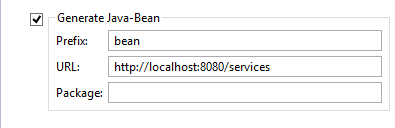
In order to enable this feature within the isCOBOL Service Editor, just check the option Generate Java-Bean.
Bean structure
The bean class exposes the following methods:
Returns the value of the given parameter. parameter_name doesn’t necessarily with the COBOL data item. This name is affected by ELK Directives.
Sets the value of the given parameter. parameter_name doesn’t necessarily with the COBOL data item. This name is affected by ELK Directives.
The above pair of methods is repeated for each Linkage Section item. Other methods exposed:
The bean source code includes also two copybooks that allow you to include custom code.
By relying on these copybooks you can invoke set<parameter_name>() to set the parameters for the Web Service and then invoke run(). In this way you obtain a stand alone COBOL program that can consume the Web Service.

Copyright (c) 2017 Veryant
Contact us
Please share your comments on this manual or on any
Veryant product documentation with the email button at the top left