The client javascript library we recommend to work with is called AngularJS (http://angularjs.org/), and is developed and supported by Google.
• It contains the application declaration (angular.module('appTutorial', []);)The controller is injected with a $scope variable, which represents the current instance of the controller itself, and $http, which is an object provided by the AngularJS library that supports http requests to servers.We define our model using $scope.customer={}, which creates an empty JSON object that will be filled by the isCobol program:
Also, the controller defines methods to handle the buttons placed in the form, used for data navigation and processing. For example, the getNextCustomer method calls a COBOL entry point called AWEBX-NEXT that fetches the next customer in the dataset:
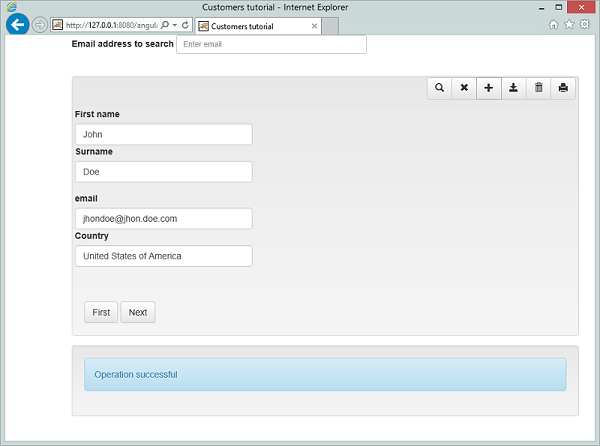
Next, we need to bind the page, or a section of a page, to a controller. In this sample we bind the CustomerCtrl (Customer Controller) to a div, this means that each control inside the div will have access to the model and methods defined in the controller. The binding is done using the directive
<input type="text" class="form-control" ng-model="customer.name" id="edFirstname" style="width:280px" />
The callServerWithJson utility method accepts the entry point to call, a model to pass to the isCOBOL program, and 2 callbacks, that specify the function to execute if the http request is successful onSuccess, or if it fails onError.Notice that the onSuccess will be called even if the isCOBOL program generates and error (duplicated key, record locked, and so on). This is because the HTTP request was carried out successfully, but a logical program error occurred. So the onSuccess method needs to check the response object and handle it appropriately.The onError callback will be invoked only if the http request fails (network error, server error,...).
| Copyright (c) 2017 Veryant |
| Contact us |
|
Please share your comments on this manual or on any Veryant product documentation with the email button at the top left |