skip to main content

COBOL Servlet option (OOP) : COBOL Servlet Programming

COBOL Servlet Programming
Following you will find an explanation about how to develop a simple COBOL servlet that builds an HTML page using a header.htm page and a footer.htm page, filling them with the correct message and sending a text string between them, the string is "Hello world from isCOBOL!".
The Web Servlet container used for this example is Tomcat 7.
This program needs to take the following steps:
Create a file called web.xml in doctest/WEB-INF folder with the following content:
<?xml version="1.0" encoding="UTF-8"?>
<web-app xmlns:xsi=http://www.w3.org/2001/XMLSchema-instance xmlns="http://java.sun.com/xml/ns/javaee" xmlns:web="http://java.sun.com/xml/ns/javaee/web-app_2_5.xsd" xsi:schemaLocation="http://java.sun.com/xml/ns/javaee http://java.sun.com/xml/ns/javaee/web-app_2_5.xsd" id="WebApp_ID" version="2.5">
  <display-name>isCOBOL EIS</display-name>
  <welcome-file-list>
    <welcome-file>Hello.htm</welcome-file>
  </welcome-file-list>
  <filter>
        <filter-name>isCOBOL filter</filter-name>
        <filter-class>com.iscobol.web.IscobolFilter</filter-class>
  </filter> 
  <filter-mapping>
        <filter-name>isCOBOL filter</filter-name>
        <url-pattern>/servlet/*</url-pattern>
  </filter-mapping>
  <servlet> 
        <servlet-name>isCobol</servlet-name>
        <servlet-class>com.iscobol.web.IscobolServletCall</servlet-class>
  </servlet>
  <servlet-mapping>
        <servlet-name>isCobol</servlet-name>
        <url-pattern>/servlet/*</url-pattern>
  </servlet-mapping>
  <listener>
   <listener-class>com.iscobol.web.IscobolSessionListener</listener-class>
  </listener>
Create a Hello.htm web form to call a COBOL servlet called HELLO:
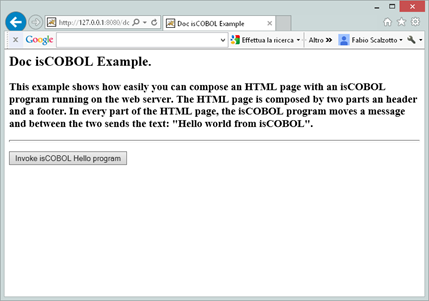
<HTML><HEAD><TITLE>Doc isCOBOL Example</TITLE></HEAD>
<H2>Doc isCOBOL Example.</H2>
<H3>This example shows how easily you can compose an HTML page with an isCOBOL program running on the web server. The HTML page is composed by two parts an header and a footer. In every part of the HTML page, the isCOBOL program moves a message and between the two sends the text: "Hello world from isCOBOL".</H3>
<HR size="2">
<FORM method="post" action="servlet/isCobol(HELLO)">
    <p><input type="submit" value="Invoke isCOBOL HELLO program" /></p>
Note that in POST method of HTML form there is the call of the COBOL Servlet called HELLO.
Create a Header.htm as follow:
<HEAD><TITLE>CGI Header</TITLE></HEAD>
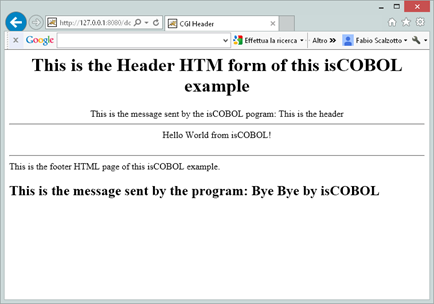
<H1>This is the Header HTM form of this isCOBOL example</H1>
<H2>This is the message sent by the isCOBOL program: %%opening-message%%</H2>
Note that this form displays the top of the HTML page that the program HELLO.cbl will build; as we can see, the <HTML>, <BODY> and <CENTER> tags are not closed, and there is the string %%opening-message%% that will be managed and replaced by the COBOL servlet program.
Create a Footer.htm web form as follow:
<H2>This is the message sent by the program: %%closing-message%%</H2>
Note that this form displays the bottom of the HTML page that the program HELLO.cbl will build. Here the tags <HTML>, <BODY> and <CENTER> are closed and there is the string %%closing-message%% that will be managed and replaced by the COBOL servlet program.
Create a HELLO.cbl COBOL Servlet program as follows:
       PROGRAM-ID. HELLO initial.
       CONFIGURATION SECTION.
       REPOSITORY.
       class web-area as "com.iscobol.rts.HTTPHandler"
       WORKING-STORAGE SECTION.
       01  hello-buffer pic x(40value "Hello World from isCOBOL!".
       01  rc pic 9.
       01  html-header-form identified by "Header".
            05  identified by "opening-message".
                10 opening-message pic x(40).
       01  html-footer-form identified by "Footer".
            05  identified by "closing-message".
                10  closing-message pic x(40).
       LINKAGE SECTION.
       01 comm-area object reference web-area.
       PROCEDURE DIVISION using comm-area.
           move "This is the header" to opening-message
           set rc = comm-area:>processHtmlFile (html-header-form).
           comm-area:>displayText  (hello-buffer).
           move "Bye Bye by isCOBOL" to closing-message
           set rc = comm-area:>processHtmlFile (html-footer-form).
Note that the COBOL servlet does the following steps:
at the exit of the program, the page HTML will be sent to the Web Server.
Once doctest.war file is deployed correctly in Tomcat servlet container, we can try it using http://127.0.0.1:8080/doctest, assuming to have Tomcat running on localhost using default 8080 port.
By pressing the "Invoke isCOBOL Hello program" button, the result is:

Copyright (c) 2017 Veryant
Contact us
Please share your comments on this manual or on any
Veryant product documentation with the email button at the top left