skip to main content

COBOL Servlet option (OOP) : COBOL Servlet Programming with AJAX and JSON

COBOL Servlet Programming with AJAX and JSON
JSON or JavaScript Object Notation, is an open standard format that uses text easy to understand to transmit data objects consisting of attribute-value pairs. It is used primarily to transmit data between a server and web application, as an alternative to XML.
Although originally derived from the JavaScript scripting language, JSON is an independent data format, and code for parsing and generating JSON data is readily available in a large variety of programming languages.
Here we will show how to develop a simple web application of data file management that uses JSON stream to communicate data from COBOL servlet to HTML pages.
The following example is located in sample/eis/http/json folder. The README.txt file explains how it works and how to deploy it.
This example needs to take the following steps:
In awebx.htm there is included a Javascript code based on JQUERY to be able to call some COBOL servlet entry point making a GET request type (default) and receiving JSON data stream:
function callServer (cobolProg) {
    var url = "servlet/isCobol(" + cobolProg + ")";
    var parm = $("form").serialize();
      return false;
callServer("AWEBX"); // program initialization
Note the once AWEBX COBOL Servlet is loaded the INIT paragraph is executed:
           set declaratives-off to true.
           move low-values to r-awebx-email.
           open i-o awebxfile.
           set declaratives-on to true.
           if file-status > "0z" and file-status not = "41"
              open output awebxfile
              open i-o awebxfile.
           comm-area:>displayJSON (ok-page).
associates to every HTML button a AWEBX entry point to be executed when the button is clicked :
<input type="submit" value="Insert" onclick="return callServer('AWEBX_INSERT');">
<input type="submit" value="Search" onclick="return callServer('AWEBX_SEARCH');">
<input type="submit" value="Next"   onclick="return callServer('AWEBX_NEXT');">
<input type="submit" value="Update" onclick="return callServer('AWEBX_UPDATE');">
<input type="submit" value="Delete" onclick="return callServer('AWEBX_DELETE');">
Note that the above HTML is able to call the following COBOL servlet entry-point:
            entry "AWEBX_INSERT" using comm-area.
            goback.
            entry "AWEBX_SEARCH" using comm-area.
            entry "AWEBX_NEXT" using comm-area.
            entry "AWEBX_UPDATE" using comm-area.
      <input type="text" name="name" size="25" placeholder="Name"/><br/>
      <input type="text" name="surname" size="25" placeholder="Surname"/><br/>
      <input type="text" name="email" size="25" placeholder="E-mail"/><br/>
      <select name="country"  placeholder="Country">
       <option value="" selected="selected" disabled="disabled">Country</option>
        <option value="us">US</option>
        <option value="it">Italy</option>
        <option value="fi">Finland</option>
        <option value="nl">The Netherlands</option>
        <option value="de">Germany</option>
        <option value="fr">France</option>
        <option value="sp">Spain</option>
        <option value="uk">United Kingdom</option>
      </select><br/>
       01 comm-buffer identified by "_comm_buffer".
          03  filler identified by "_status".
              05 response-status pic x(2).
          03  filler identified by "_message".
              05 response-message pic x any length.
          03  filler identified by "name".
              05  json-name pic x any length.
          03  filler identified by "surname".
              05  json-surname pic x any length.
          03  filler identified by "email".
              05  json-email pic x any length.
          03  filler identified by "country".
              05  json-country pic x any length.
           entry "AWEBX_INSERT" using comm-area.
           comm-area:>accept(comm-buffer).
           move spaces to error-status.
           perform check-values.
           if error-status = spaces
              move json-name    to r-awebx-name
              move json-surname to r-awebx-surname
              move json-email   to r-awebx-email
              move json-country to r-awebx-country
              write rec-awebxfile
              move "Operation successful" to ok-message;;
              comm-area:>displayJSON (error-page).
           entry "AWEBX_NEXT" using comm-area.
           read awebxfile next
           move r-awebx-name    to json-name
           move r-awebx-surname to json-surname
           move r-awebx-email   to json-email
           move r-awebx-country to json-country
           move "OK" to response-status
           move "" to response-message;;
           comm-area:>displayJSON (comm-buffer).
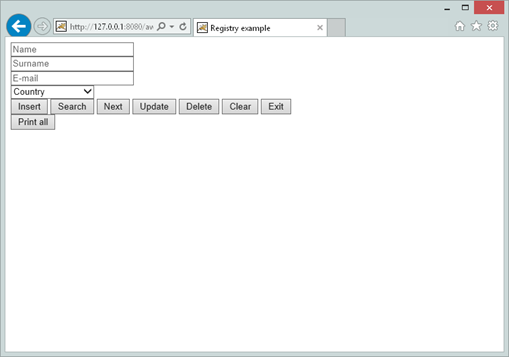
This is the output form of awebx.htm used in previous example:

Copyright (c) 2017 Veryant
Contact us
Please share your comments on this manual or on any
Veryant product documentation with the email button at the top left