skip to main content

COBOL Servlet option (OOP) : COBOL Servlet Programming to replace CGI COBOL programming

COBOL Servlet Programming to replace CGI COBOL programming
The scope of this paragraph is to show how to migrate older CGI COBOL program to isCOBOL Servlet taking advantage of useful features of HTTPHandler class. Usually few changes are required and most of the sources will be unchanged.
Conversion of the ACUCOBOL-GT Oscars sample
The following example is located in sample/eis/http/getpost/acucgi2is folder. The README.txt file explains how it works and how to deploy it.
This example needs to take the following steps:
<FORM method="post" action="servlet/isCobol(OSCARS)">
Assuming to have a Web form called oscars.htm with the following controls:
<input type=checkbox name=y1996 value=1996> 1996
<input type=checkbox name=y1995 value=1995> 1995
<input type=checkbox name=y1994 value=1994> 1994
<input type=checkbox name=y1993 value=1993> 1993
<input type=checkbox name=y1992 value=1992> 1992
<input type=checkbox name=y1991 value=1991> 1991
<input type=checkbox name=y1990 value=1990> 1990
<input type=checkbox name=y1989 value=1989> 1989
<input type=checkbox name=y1988 value=1988> 1988
<input type=checkbox name=y1987 value=1987> 1987
<input type=checkbox name=y1986 value=1986> 1986
<input type=checkbox name=y1985 value=1985> 1985
<input type=”submit” value=”Submit Query” >
Checking one or more years and pressing the 'Submit query' button, the OSCARS COBOL servlet program is called.
 
The OSCARS COBOL program need to be compiled with the following options:
having the following regexp in the Compiler configuration:
and the following setting in the Runtime configuration:
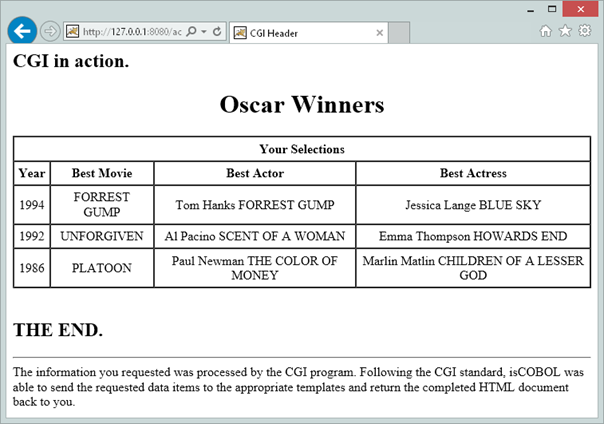
The result choosing 1994, 1992 and 1986 is the following:
Conversion of the Micro Focus sample
Using the above approach is also possible to migrate a Micro Focus COBOL CGI program to COBOL Servlet.
Under sample/eis/http/getpost/ mfcgi2is folder you find an example of a Micro Focus Cobol CGI program rewritten to run with the HTTP option of isCOBOL EIS.
The README.txt file explains how it works and how to deploy it.
This example needs to take the following steps:
<BODY><FORM id=form1 name=form1 action="servlet/isCobol(WEBDEMO)" method=post >
Assuming to have a Web form called WebDemo.htm with the following controls:
<INPUT id=checkbox1 type=checkbox value=on name=checkbox1>Vanilla
<INPUT id=checkbox2 type=checkbox value=on name=checkbox2>Chocolate
<INPUT id=checkbox3 type=checkbox value=on name=checkbox3>Marble
<INPUT id=radiobutton1 type=radio value=White name=radio>White
<INPUT id=radiobutton2 type=radio value=Chocolate name=radio>Chocolate
<INPUT id=radiobutton3 type=radio value=Blue name=radio>Blue
<SELECT id=select1 name=select1> <OPTION selected>Cash<OPTION>Visa<OPTION>Check<OPTION>Mac</OPTION></SELECT>
The WEBDEMO COBOL program need to be compiled with the following options:
having the following regexp in the Compiler configuration:
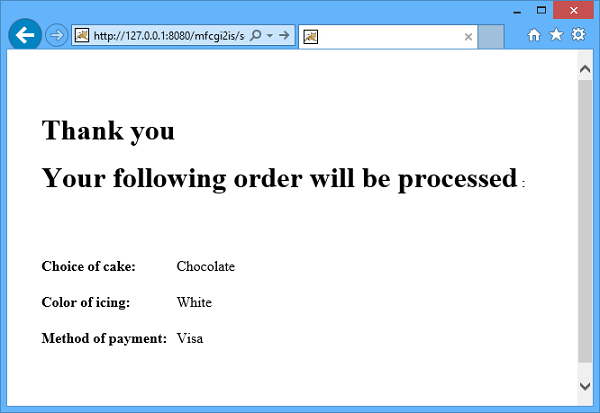
The result choosing Chocolate cake, White icing and Visa payment is the following:

Copyright (c) 2017 Veryant
Contact us
Please share your comments on this manual or on any
Veryant product documentation with the email button at the top left