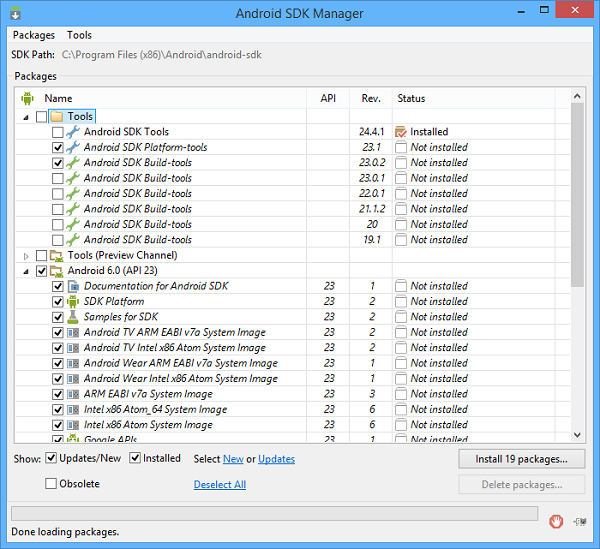
The below instructions explain how to download and install the SDK on Windows. For information on how to install the SDK on other platforms, refer to the official site http://developer.android.com.In order to download the Android SDK, navigate to http://developer.android.com/sdk/index.html and scroll down to “Get just the command line tools”. Choose the proper zip file according to the platform where you’re going to develop. Aaccept the terms and conditions, then proceed with the download.Once the download is complete, unzip the archive in a folder of your choice, for example on Windows you could unzip it under C:\AndroidSDK and you obtain C:\AndroidSDK\tools. Run the android command (android.bat) within the tools folder in order to start the SDK manager.By default the SDK Manager allows to install the latest platform tools, system image and USB driver, but you can install also previous versions as well as additional resources. Mark the items that you wish to install, then click on the Install packages... button.At the end of the installation, you will find a new folder named platform-tools at the same level of tools.Once the Android SDK has been installed, add the tools and platform-tools directories of Android’s SDK to the PATH environment variable in order to be able to run android commands from the command line.
| Copyright (c) 2017 Veryant |
| Contact us |
|
Please share your comments on this manual or on any Veryant product documentation with the email button at the top left |