1. Right click on the html folder
2. Choose New > Other...
3. Choose Web > HTML File...
4. Click on the Next button
5.
6. Put the Content of Index.html in the fileNote - Veryant suggests to run an external browser for the test. You can instruct the IDE to launch an external browser by following these simple steps:
1. Click on the Window menu
2. Choose Preferences
3.
5. Click Ok
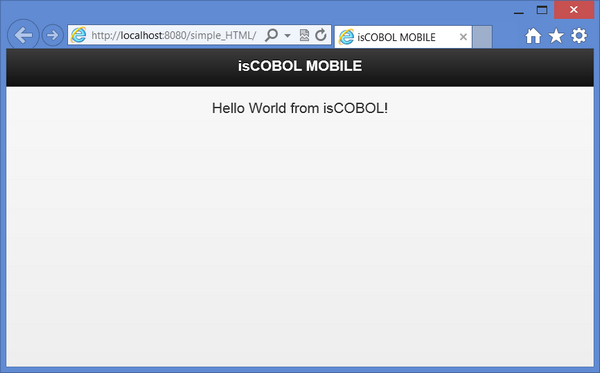
2. Choose Run As > isCOBOL EIS ApplicationIf you wish to debug the COBOL program, choose Debug As > isCOBOL EIS Application, insteadNote - The debug of an 'EIS Application' consists in a remote debug session of the 'Jetty' application server included in the IDE. The first time the Debugger server suspends itself because it is waiting for a connection from the client; when the debugged program ends, the Debugger session doesn’t terminate as it would happen in a stand alone Debugger session. The connection with the client part is still active. So the Debugger server goes in a 'continue' state, it means that it will suspend only when a breakpoint is reached. Hence, in order to debug the program another time, it is necessary to set some breakpoints.Before going to the next step, that will make you run the simple hello world application on Android, it’s necessary to provide a valid isCOBOL Mobile license key in the file iscobol.properties under the resources folder.Edit the file iscobol.properties under the html folder and insert your license key. At the end, the file should look like this:
iscobol.mobile.license.2017=<your license code>
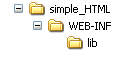
1. Create the following folder structure under Tomcat’s webapps directory:
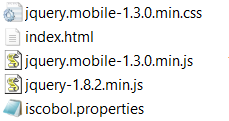
2. Put the following files under simple_HTML:
3.
4.
<web-app xmlns:xsi="http://www.w3.org/2001/XMLSchema-instance" xmlns="http://java.sun.com/xml/ns/javaee" xmlns:web="http://java.sun.com/xml/ns/javaee/web-app_2_5.xsd" xsi:schemaLocation="http://java.sun.com/xml/ns/javaee http://java.sun.com/xml/ns/javaee/web-app_2_5.xsd" id="WebApp_ID" version="2.5"><display-name>testHTML</display-name><welcome-file>index.html</welcome-file><welcome-file>index.htm</welcome-file><welcome-file>index.jsp</welcome-file><welcome-file>default.html</welcome-file><welcome-file>default.htm</welcome-file><welcome-file>default.jsp</welcome-file><filter-name>isCOBOL filter</filter-name><filter-class>com.iscobol.web.IscobolFilter</filter-class><filter-name>isCOBOL filter</filter-name><servlet-name>isCobol</servlet-name><servlet-class>com.iscobol.web.IscobolServletCall</servlet-class><servlet-name>isCobol</servlet-name><url-pattern>/servlet/*</url-pattern><listener-class>com.iscobol.web.IscobolSessionListener</listener-class>
<title>Test Mobile </title>} catch (err) {_status = xml.find ("_status");_message = xml.find( "_message" );_hello = xml.find( "hellotext" );jQuery("#hello_div").html(_hello.text());window.onload = callServer("HELLO"); </div><!-- /page -->
| Copyright (c) 2017 Veryant |
| Contact us |
|
Please share your comments on this manual or on any Veryant product documentation with the email button at the top left |