skip to main content

Integrated Development Environment (IDE) : Working with Projects : Run and Debug : External Debugger

External Debugger
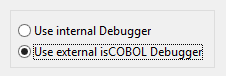
By default, when you debug a program, the IDE switches to the Debug perspective. If you prefer to use the standard isCOBOL Debugger, started outside of the IDE, you can configure it as follows:
1.
click on Window in the IDE menu bar
2.
choose Preferences
3.
expand the isCOBOL tree
4.
choose Run/Debug
5.
6.
 
For more information about isCOBOL Debugger, please consult Debugger.

Copyright (c) 2017 Veryant
Contact us
Please share your comments on this manual or on any
Veryant product documentation with the email button at the top left