skip to main content

Integrated Development Environment (IDE) : Working with Screen Programs and File Layouts : Screen Program properties

Screen Program properties
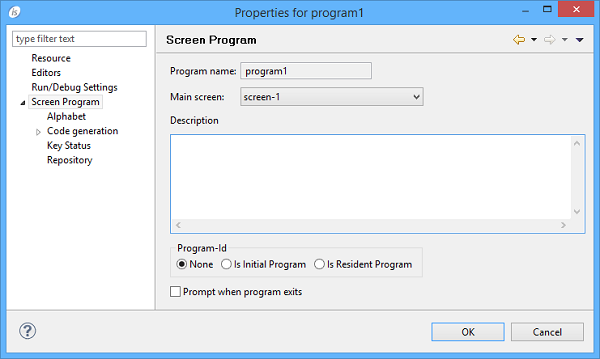
To set Screen Program properties, right click on the program name and choose “Properties” from the pop-up menu. The following panel appears.
From the main screen you can set:
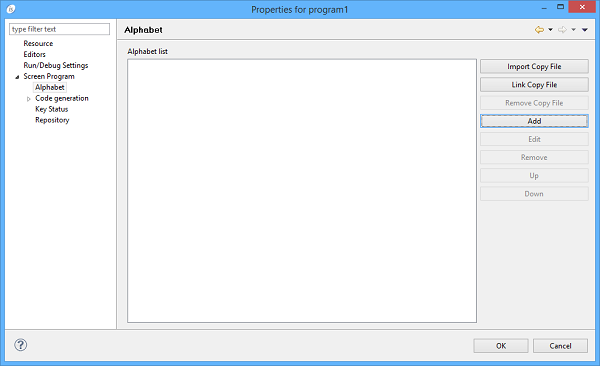
The Alphabet screen allows to provide alternate collating sequences to the program.
Click on the Add button to add a new alphabet to the list (opens the dialog explained below)
Click on the Edit button to edit the selected alphabet (opens the dialog explained below)
Click on the Remove button to remove the selected alphabet from the list
Click on the Up and Down buttons to move the selected alphabet up or down in the list controlling the order alphabets will appear in the program Special-Names
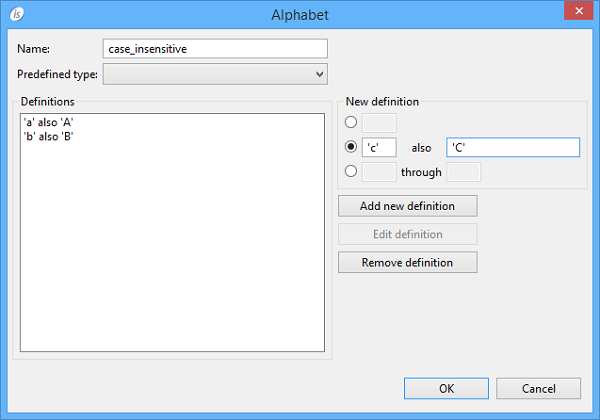
Add and Edit open a dialog where you can provide the alphabet name and the alphabet definitions. The screenshot below shows a work in progress case insensitive alphabet.
Compile New Definition fields and click the Add new definition button to add definitions
Select a definition from the list and click Edit definition to modify it or Remove definition to remove it

Copyright (c) 2017 Veryant
Contact us
Please share your comments on this manual or on any
Veryant product documentation with the email button at the top left