skip to main content

Integrated Development Environment (IDE) : Working with Screen Programs and File Layouts : Drawing the Screen : BAR

BAR
TRUE...The Dashed style is generated
FALSE... The Dashed style is not generated
Specifies the value for the Custom-Data property.
AUTOMATIC...neither the Temporary nor Permanent styles are generated
TEMPORARY...Temporary style is generated
PERMANENT...Permanent style is generated
TRUE...The Dot-Dash style is generated
FALSE... The Dot-Dash style is not generated
TRUE...The Dotted style is generated
FALSE... The Dotted style is not generated
NONE...Enabled property is not generated
TRUE... Enabled=1 is generated
FALSE...Enabeld=0 is generated
TRUE...The Height-In-Cells style is generated
FALSE... The Height-In-Cells style is not generated
TRUE...The Horizontal style is generated
FALSE... The Horizontal style is not generated
DEFAULT... Either CELLS or nothing is generated after the Lines value depending on the window’s “cell” property setting
None... Neither CELLS nor PIXELS are generated after the Lines value
CELLS... CELLS is generated after the Lines value
PIXELS... PIXELS is generated after the Lines value
TRUE...The No-Tab style is generated
FALSE...The No-Tab style is not generated
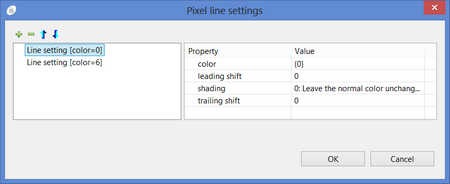
Opens a dialog that allows the user to set Color, Shading, Leading Shift and Trailing Shift for each line of pixel when the Width property is set to a value greater than 1.
Specifies the value for the Position-Shift property
DEFAULT... Either CELLS or nothing is generated after the Size value depending on the window’s “cell” property setting
None... Neither CELLS nor PIXELS are generated after the Size value
CELLS... CELLS is generated after the Size value
PIXELS... PIXELS is generated after the Size value
NONE...Visible property is not generated
TRUE... Visible=1 is generated
FALSE...Visible=0 is generated
TRUE...The Width-In-Cells style is generated
FALSE... The Width-In-Cells style is not generated

Copyright (c) 2017 Veryant
Contact us
Please share your comments on this manual or on any
Veryant product documentation with the email button at the top left