skip to main content

Integrated Development Environment (IDE) : Working with Screen Programs and File Layouts : Adding a new Screen to the program

Adding a new Screen to the program
A program can contain more than one screen. To add screens in addition to the one created with the program:
1.
2.
Select New / Screen from the pop-up menu.
The wizard procedure allows you to choose between creating a blank screen or starting from a template. See Loading Screen Templates for more details about templates.
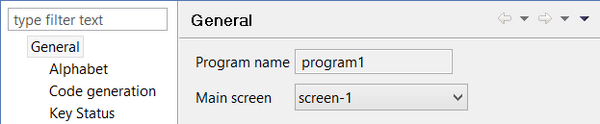
When the program contains more than one screen, it’s necessary to set which one is the main screen. To specify the main screen, right click on the program name and select Properties from the pop-up menu.
When the program contains more than one screen, it’s very important to set the proper window type for each one of the screens. The main screen should be STANDARD or INITIAL, while the other ones must be FLOATING or INDEPENDENT. To set the window type:
1.
2.
Set the window type property in the Properties view.

Copyright (c) 2017 Veryant
Contact us
Please share your comments on this manual or on any
Veryant product documentation with the email button at the top left